Pressure Switch
In pump control panels, booster pump systems, hydraulic stations, cooling water systems, and dry-run protection circuits, pressure switches are commonly used for low-pressure alarm, high-pressure alarm, pump start/stop, and safety interlock.
However, many field problems are not caused by a failed pressure switch.
They are caused by a mismatch between the pressure switch output type and the PLC or control cabinet input type.
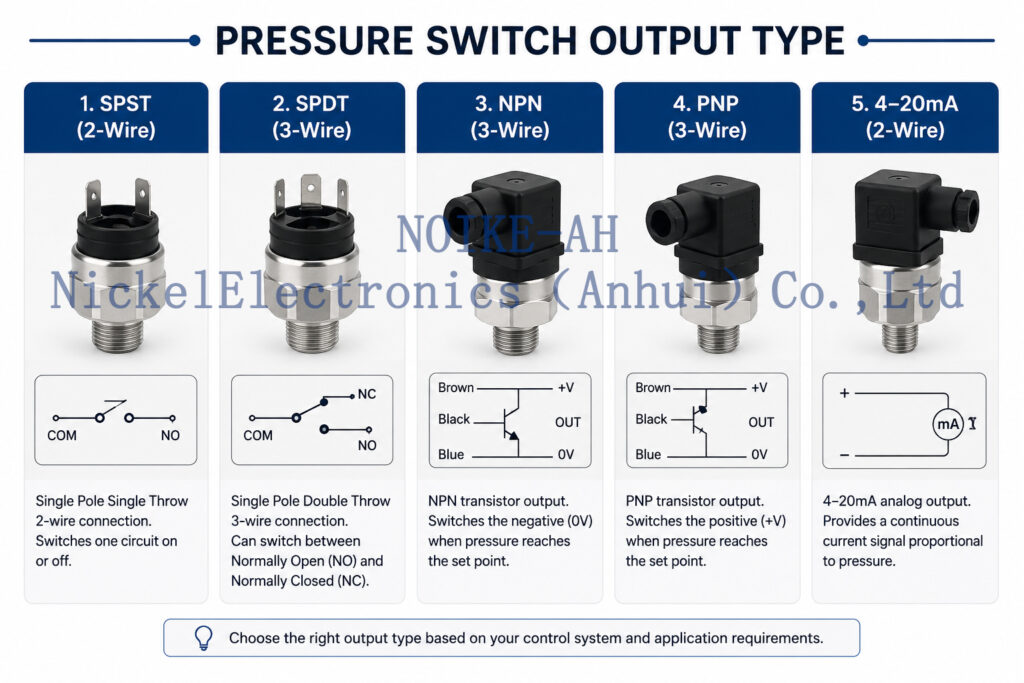
Common pressure switch output types include:
| Output Type | Description |
|---|---|
| Mechanical contact | Dry contact, no active voltage output |
| Relay output | Isolated COM / NO / NC contact |
| NPN output | Current sinking transistor output |
| PNP output | Current sourcing transistor output |
| Analog output | 4–20mA or 0–10V continuous signal |
| IO-Link | Digital communication output |
AutomationDirect explains that PNP sensors are current sourcing devices and NPN sensors are current sinking devices; sourcing sensors must be connected to sinking inputs, and sinking sensors must be connected to sourcing inputs.
Typical Symptoms
Common symptoms include:
- pressure switch LED changes, but PLC DI does not change;
- PLC input is always ON;
- low-pressure alarm does not trigger;
- dry-run protection fails;
- pump cannot start or stop;
- 24VDC fuse trips;
- sensor output is damaged;
- replacing the pressure switch does not solve the issue.
Output Type Explanation
Mechanical Contact
A mechanical pressure switch usually provides COM, NO, and NC contacts.
It does not output voltage by itself.
The control cabinet must provide the input voltage required by the PLC digital input circuit.
Relay Output
Relay output is similar to a dry contact but driven by an electronic pressure switch.
It is useful when electrical isolation or wider PLC input compatibility is required.
NPN Output
An NPN output is a current sinking output.
When ON, it pulls the output signal toward 0V.
It should be matched with a sourcing PLC input.
PNP Output
A PNP output is a current sourcing output.
When ON, it supplies +24V to the PLC input.
It should be matched with a sinking PLC input.
AutomationDirect’s PLC fundamentals note that proper wiring requires knowing whether the sensor switches the positive side or the negative side of the circuit.
Field Troubleshooting Procedure
Before replacing the pressure switch, check the complete signal chain:
- Confirm the pressure switch model.
- Check the output type: dry contact, relay, NPN, PNP, analog, or IO-Link.
- Confirm supply voltage.
- Check NO / NC logic.
- Measure output voltage with a multimeter.
- Confirm PLC digital input type.
- Check DI common wiring.
- Verify PLC program logic.
- Check whether an interposing relay is required.
- Confirm M12 pinout and cable color definition.
Typical Wiring Mistakes
Common mistakes include:
- connecting a PNP pressure switch to an NPN-compatible input;
- connecting an NPN pressure switch to a PNP-compatible input;
- treating a transistor output as a relay contact;
- using a dry contact without external input voltage;
- wiring NO instead of NC;
- using AC input modules with DC transistor outputs;
- ignoring output load current rating;
- replacing a pressure switch without checking pinout.
NOIKE-AH Application
For pump control panels, constant pressure water supply, hydraulic systems, cooling water circulation, and industrial process control, NOIKE-AH can provide pressure switches, intelligent pressure switches, pressure transmitters, pressure gauges, and digital pressure gauges. NOIKE-AH’s product range covers flow, pressure, temperature, level, and secondary instruments, and its Pressure Series includes pressure gauges, pressure switches, pressure sensors, pressure transmitters, and differential pressure transmitters. (Noike-AH)
Recommended matching logic:
| Control Cabinet Input | Recommended Solution |
|---|---|
| Relay circuit | Relay output pressure switch |
| PLC DI, COM = 0V | PNP output pressure switch |
| PLC DI, COM = +24V | NPN output pressure switch |
| Safety interlock | NC dry contact or relay NC |
| Continuous pressure monitoring | 4–20mA pressure transmitter |
| Local display + switching | Intelligent pressure switch |
Conclusion
A pressure switch output mismatch can cause PLC input failure, false alarm, pump interlock failure, or sensor damage.
The correct troubleshooting sequence is:
pressure switch model → output type → NO/NC setting → power supply → output voltage → PLC DI type → DI common → PLC logic → interlock function
A pressure switch should not be selected only by pressure range and thread size.
Its output type must match the control cabinet input type.